Table of Contents
Lead CNC
Mechanical Assembly Instructions
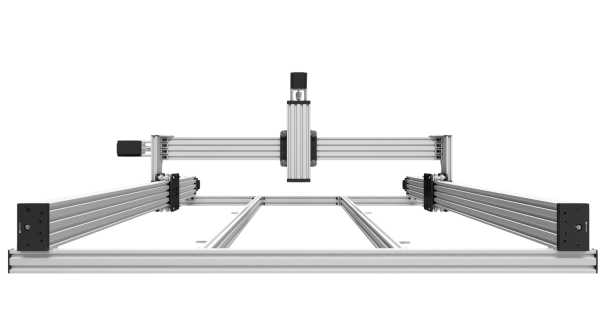
Safety Statement
The author of this document is not liable or responsible for any accidents, injuries, equipment damage, property damage, loss of money or loss of time resulting from improper use of electrical or mechanical or software products.
Assembling electrical and mechanical CNC machine components like power supplies, motors, drivers or other electrical and mechanical components involves dealing with high voltage AC (alternating current) or DC (direct current) and other hazadous items which can be extremely dangerous and needs high attention to detail, experience, knowledge of software, electricity, electro-mechanics and mechanics.
Before starting please read though all the instructions.
About The Maker Store Lead CNC Kit
The mechanical kit is based on the Open Builds Lead CNC Machine designed and published on openbuilds.com. There are however a couple of difference between the Openbuilds design and the Maker Store Lead CNC Kit. None of the differences are that great and the Openbuilds YouTube videos available on putting the Lead CNC together are a great resource and starting point for everyone. Most of the differences are a result of customer feedback and modifications published on a wide number of internet forums.
Please note that while we have spent a considerable amount of time and effort putting these instructions together, any errors and omissions excepted (E&OE). If you find an error or have a suggestion on how to make this manual better/clearer or etc, please let us know so we can continually improve this resource.
These assembly instructions are for the following machines:
Unpack and Check All Components
Before starting any build, it is always a great idea to get organised. Start by unpacking your kit and checking it against the BOM (Bill of Materials). If you find any parts missing, please contact Maker Store as soon as possible.
Tools Required
You will also need the following tools:
- Screw Drivers
- Builder‘s or Machine Square
Pre-Assembly Notes
- While these instructions have drawings for the 1500 x 1000mm Lead CNC Machine, construction of other size Machines is, in principle, the same.
- It is Important to make sure all angles are square. As you progress through your build, use the Square to make sure everything is aligned before the final tightening of all screws and nuts.
- This build requires some of the V-Slot to be tapped with a M5 tap. In general tap to a depth of 8-10mm and clean away any swarf and burs.
- When placing any V-Wheels onto the V-Slot, make sure the Eccentric Spacers are adjusted to their furthest point. Do not force the wheels on as this may damage them creating a little ‘bump’.
- CAD models are available for download from the Maker Store website or via customer support. They are a fantastic resource and can allow you to move through the design, pull things apart, and measure wherever required. We strongly recommend downloading the model and becoming familiar with the CAD files.
Wheel Assembly
Assemble all the Solid V Xtreme Wheels as per the drawing. It can help to use one of the longer screws to align everything by threading the parts on one by one. The Wheel Packs come with an extra Shim and M5 Nut, put these to one side as they will be needed later.

Y-Axis and A-Axis Gantry Assembly Part 1
Start the Y/A-Axis Gantry Assembly by putting the Y/A-Axis Gantry Plates together as per the drawing below. Make sure to correctly orientate the plates so the Eccentric Spacers are at the bottom and the squares in the centre of the plates are on the outside. Do not tighten the nut blocks as they will need to be adjusted later.

Attach the upright 2080 x 250mm to the gantry using the Black Angle Corner Connectors. Note the screws going into the Gantry Plate are 10mm while the screws going into the 2080 and Tee Nuts are 8mm.

Complete both the Y and A Gantry Plates. When done they should be as shown below.

Y-Axis and A-Axis Gantry Assembly Part 2
Roll the Y-Axis and A-Axis Gantries onto the Y and A C-Beam. Turn the lead screw and “screw” the gantry until it is completely on the C-Beam rail. Adjust and tighten the 2 x Anti-Backlash Nut Blocks so that the Leadscrew can turn easily with no backlash. Adjust and tighten the Eccentric Spacers so the gantry rolls smoothly and without “wobble”.

Attach the End Mount, Stepper Motor and Coupler as shown below.

Attach the non-motor End Mount to the Y and A-Axis C-Beam rail. Make sure to insert 4 x T-Nuts (2 in each bottom slot) for later use to connect to the base.


X-Axis Gantry Assembly
Put the X Gantry Assembly together as below. Do not tighten the nut block yet as they will need to be adjusted. Make sure the 4 x M5 60mm (#7) are orientated as per the drawing below. If they are reversed, then the Assembly will not fit onto the Z-Axis Assembly (see Z-Axis Assembly section below).

The completed X-Axis Gantry Assembly should look as below:

Z-Axis Assembly
First put together the Z-Axis Gantry Plate:


Second, put together the Z-Axis Actuator base and lead screw:


Before attaching the base, slide the Z-Axis Gantry Assembly onto the C-Beam threading the lead screw into the nut-block.
Attach the base to complete the Z-Axis Assembly. Make sure to insert T-Nuts into the C-Beam for the Spindle Mounting Brackets (the Spindle Mounting Bracket is an optional extra and not part of the kit).

The Completed Z-Axis Assembly will look as below:

X-Z Assembly
Using 4 x M5 10mm screws put together the X-Axis Assembly and the Z-Axis Assembly:

Note how the 10mm screws are inside the X-Axis Assembly. Also note the orientation of both assemblies – on the X-Axis the Eccentric spacers are on the bottom and the Z-Axis Gantry Plate is at 90 degrees to the X-Axis Gantry Plate.
Another view:

Place the X-Z Gantry onto the X C-Beam rail. Thread the lead screw through the X-Gantry Nut Blocks and adjust and tighten. Attach both End Mount Plates to the C-Beam in the same way as the Y and X Axis. Make sure to insert T-Nuts for mounting into the C-Beam before attaching the last End Mount.

X-Axis, A-Axis and Y-Axis Assembly
Attach the X-Axis Assembly to both the Y-Axis and A-Axis Assemblies using the 5 Hole Joining Plate and Cast Corner Brackets. Make sure to square all assemblies before tightening.

Note, there is one Cast Corner Bracket located under the X-Axis Gantry Assembly.


Y-Axis and A-Axis Assemblies to Base
Begin by using the Double L Bracket, 8mm screws and T-Nuts to attach the 2 x 2040 Centre Support Rails to the 2 x 2040 Base Support Rails (front and back). Note the centre support rails have the 40mm side parallel to the horizontal (face up) while the front and back rails have the 20mm face parallel to the horizontal (see image below).
Then place the Y-Axis, A-Axis and X-Axis Assembly on to the base, square everything and secure with Double L Brackets, 8mm screws and T-Nuts. Note that when the assembly sits on the front and back Base Support Rails there will be a space on both the left and right sides. The assembly can be placed so the space is on either side (i.e., centred) or flush on one side with a large space on the other side. In this way the space can be used to support and assist in cable management.
Note the C-Beam of the Y-Axis and X-Axis is the same length as the 2040 Centre Support Rails. This means that the Y-Axis and A-Axis sit flush to the internal face of the Base Support Rails with the End Mount Plate sitting on the top of the Base Support Rails (See A below).


Attach the End Caps to the Base Support Rails.

Cable Drag Chain Support V-Slot
| Item | Description | Quantity |
| 1 | 15mm M5 Low Profile Screw | 1 |
| 2 | L1 Bracket | 1 |
| 3 | 6mm Aluminum Spacer | 1 |
| 4 | Drop in T-Nuts | 1 |
Attach the 2x L1 Brackets to the X-Axis C-beam using 2x 15mm M5 Low Profile Screws 2x 6mm Aluminum Spacers and 2x Drop in T-Nuts as per the below diagram.
When attaching the Brackets place one at each on at each end of the X-Axis.


| Item | Description | Quantity |
| 1 | 2040 V-Slot Extrusion | 1 |
| 2 | 8mm M5 Low Profile Screw | 4 |
| 3 | Tee nut | 2 |
| 4 | 2040 End Cap | 1 |
Attach the 2040 V-Slot to the L1 Brackets by using 2x Tee nuts and 2x 8mm M5 Low Profile Screws
on the opposite side you plan to run the Cable Drag Chain bundle attach the 1x 2040 End Cap using 2x 8mm M5 Low Profile


Finished

Post Assembly Notes:
- Again, square your machine – for the X, Y and Z axis.
- Using T-nuts, a base board can be attached to the base. This will strengthen the frame and create a work surface.
Credits
Special thanks to:
- Openbuilds and the Openbuilds forums
- The Open Hardware community
- Our fantastic customers, whose feedback constantly helps us improve our parts and the design of this great machine.
Bill of Materials (BOM)
| 1500×1000 | 1000×1000 | ||
|---|---|---|---|
| Description | Part Number | QTY | QTY |
| 688Z Ball Bearing – 8x16x5 | BEAR-688Z | 8 | 8 |
| 90 degree Angle Corner Connector (V-Slot) | BRAC-90ANG | 8 | 8 |
| Cast – 90 Degree Corner Bracket | BRAC-90CAST | 10 | 10 |
| Endcap – 2040 | BRAC-ENDCAP-2040 | 6 | 6 |
| Universal L Brackets – Double | BRAC-L2 | 8 | 8 |
| Nema 23 Stepper Motor 2.45N.m – High Torque | ELEC-NEMA23-635-HT | 4 | 4 |
| 8mm Metric Lead Screw / ACME – 1040mm | HARD-ACME-8-1040 | 1 | 3 |
| 8mm Metric Lead Screw / ACME – 1540mm | HARD-ACME-8-1540 | 2 | |
| 8mm Metric Lead Screw / ACME – 290mm | HARD-ACME-8-290 | 1 | 1 |
| Anti-Backlash Nut Block | HARD-ACME-8-ANTIB-BLOCK | 1 | 1 |
| 8mm Acme Nut Block | HARD-ACME-8-BLOCK | 6 | 6 |
| Lock Collar | HARD-COLL-8MM | 8 | 8 |
| 6.35mm x 8mm Flexible Coupling | HARD-COUP-635×8 | 4 | 4 |
| Nylon Insert Hex Locknut M5 | HARD-NUT-LOCK-5MM | 16 | 16 |
| Tee Nuts – M5 – Packs of 25 | HARD-TNUT-PACK25 | 3 | 3 |
| V-Slot 20 x 40mm – 1000mm | LR-2040-S-1000 | 2 | 4 |
| V-Slot 20 x 40mm – 1500mm | LR-2040-S-1500 | 2 | |
| V-Slot 20 x 80mm – 500mm | LR-2080-S-500 | 1 | 1 |
| C-Beam – 1000mm | LR-C-S-1000 | 1 | 3 |
| C-Beam – 1500mm | LR-C-S-1500 | 2 | |
| C-Beam – 250mm | LR-C-S-250 | 1 | 1 |
| Joining Plates – 5 Hole 90 degree | PLATE-90-5 | 2 | 2 |
| C-Beam End Mount | PLATE-C-END | 8 | 8 |
| C-Beam Gantry Plate – XL | PLATE-C-GANTRY-XL | 7 | 7 |
| M5 Low Profile Screws – 10mm | SCREWS-M5-LP-10-1 | 32 | 32 |
| M5 Low Profile Screws – 20mm | SCREWS-M5-LP-20-1 | 46 | 46 |
| M5 Low Profile Screws – 30mm | SCREWS-M5-LP-30-1 | 4 | 4 |
| M5 Low Profile Screws – 55mm | SCREWS-M5-LP-55-1 | 8 | 8 |
| M5 Low Profile Screws – 65mm | SCREWS-M5-LP-65-1 | 12 | 12 |
| M5 Low Profile Screws – 8mm | SCREWS-M5-LP-8-1 | 60 | 60 |
| Eccentric Spacers – 8mm Hex – 6mm Height | SHIM-ECCENTRIC-8-6 | 14 | 14 |
| Metric Aluminum Spacers – 3mm | SHIM-SPAC-3MM | 14 | 14 |
| Metric Aluminum Spacers – 40mm | SHIM-SPAC-40MM | 8 | 8 |
| Metric Aluminum Spacers – 6mm | SHIM-SPAC-6MM | 14 | 14 |
| Metric Aluminum Spacers – 9mm | SHIM-SPAC-9MM | 12 | 12 |
| Solid V Xtreme Wheel Kit | WHEEL-XTREME-SOLID-V-KIT | 28 | 28 |